
Guitar Pro
Arobas MusicMusic & Audio
2.4887.00 Reviews
- Version
- 1.9.0
- Installs
- 100.00K
- Age Rating
- Everyone
Screenshots
Our Review of Guitar Pro
 Analysis by Appyee
I think of this app as a pocket workbench for a musician who wants to move from an idea to a playable part without sitting at a computer. Guitar Pro is a paid music and audio app from Arobas Music, built around reading, playing and writing notation and tablature. That combination makes it useful for more than guitar practice: I can imagine using it to sketch a riff, hear how a phrase moves, and prepare a part to pass to other players.
It is not automatically the right choice for everyone who plays guitar. If you mainly want to stream songs, record a quick voice memo, or follow video lessons, a simpler tool will probably suit you better. Its average rating is 2.4 from around 12,000 ratings, so I would go in with measured expectations rather than assume every part of the experience feels effortless. The app has been around since 2012, and its current version is 1.9.0; what matters most is whether a notation-focused workflow fits the way you make music.
Starting with a musical problem
A realistic use case is a guitarist who has a short window to practise before rehearsal. A bandmate has sent a tab, or you have an arrangement idea that is easier to write down than explain in a message. Instead of keeping the idea in your head, you can use a score-and-tab editor to make the part readable and listen back to it. That is the central appeal: the app connects a written musical idea to something you can hear and work on.
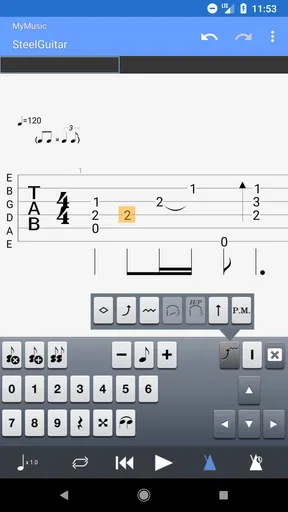
The distinction from a basic tab viewer is important. A viewer is convenient when you only need to follow a finished part, while an editor can help when you want to make a correction, build an arrangement or shape your own line. The trade-off is that editing notation asks more of you. If you do not know where notes belong on a staff or how rhythmic values fit together, the screen can feel like work before it feels creative.
From first note to practice pass
My suggested first session would be deliberately small: open a tab or start a short phrase, enter only the part you need, then play it back before trying to complete a whole song. Listening early is a useful check because a line that looks plausible on screen may not have the timing or feel you intended. Playback gives you a way to catch that mismatch while the idea is still easy to change.
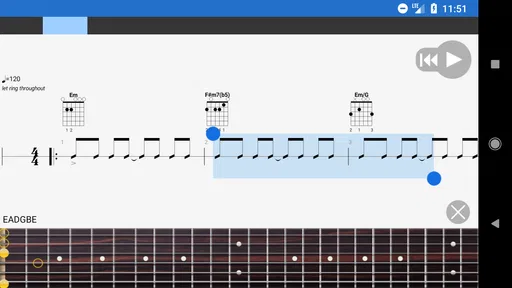
For a difficult passage, the practical move is to slow the tempo and isolate the section you are learning rather than repeatedly attempting the full piece at performance speed. That makes the app more valuable as a practice companion than as a passive library. I would still keep the instrument in hand: playback can clarify timing and note order, but it cannot tell you whether your fingering is comfortable or whether your tone matches the arrangement.
One non-obvious benefit of writing a passage down is that it exposes gaps in your own understanding. If you can hum a riff but cannot place its rhythm in the editor, that is a clue to practise counting or break the phrase into smaller pieces. I would treat the score as a thinking aid, not just a finished document. That approach is especially helpful for players who learn by ear but want to communicate their ideas more clearly.
Building an arrangement and handing it off
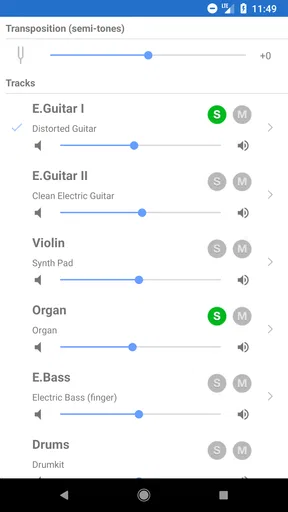
When the idea grows beyond a single guitar part, multiple tracks and support for instruments such as bass and drums can help you outline how the pieces relate. A useful workflow is to draft the main riff first, add only the parts needed to explain the arrangement, and listen for clashes before polishing details. This is not the same as recording a live band, but it can make a rehearsal conversation much more concrete: everyone can see the intended part and hear a guide version.
Exporting scores in formats such as PDF, MIDI and MusicXML gives you different ways to pass work along. A PDF is handy when another player simply needs to read the part; MIDI can be useful when someone wants to work with the musical events in another setup; MusicXML is relevant when notation needs to move between compatible score editors. Those handoffs are a meaningful advantage over keeping an idea trapped in a screenshot or a note on your phone.
You can also bring in tab files you already have, which is worth doing before rebuilding a personal collection by hand. If you move between the mobile app and a desktop version, compatibility can make the phone a place to review or develop an idea and the computer a more comfortable place for longer editing sessions. I would check that the file and export format suit the person receiving it; a convenient format for reading is not always the best format for further editing.
Where the flow can snag
The same all-in-one approach can feel crowded if your goal is simply to tune up and start playing. The tuner, chord reference and metronome are convenient extras, but they do not make a notation editor the fastest option for every small task. If you already use a dedicated tuner or metronome and rarely write tabs, paying for a broader music-writing tool may not be worthwhile.
There is also a learning curve hidden behind the promise of quick editing. Entering a note is only part of the job; choosing the right rhythm, keeping tracks clear and checking the result takes musical attention. On a phone, a detailed score can be less comfortable to inspect or edit than it is on a larger screen. I would use mobile sessions for reviewing, practising and sketching, then do intricate arranging on a desktop when that is available.
At $5.49, it is a purchase rather than a free utility, and the Everyone age rating simply makes it broadly suitable from an age-label perspective; it does not mean the editor itself is effortless for a beginner. With over 100,000 installs, it has found an audience, but the modest rating is a sensible reason to test your own workflow carefully and make sure the app behaves the way you need before relying on it for a band project.
Getting Started with Guitar Pro
First things first, Guitar Pro is available on both Android and iOS, which means you can carry your music studio in your pocket wherever you go. Once you download the app, you’ll be greeted with a sleek and intuitive interface that's surprisingly easy to navigate. Even if you’re not a tech wizard, you’ll find yourself exploring its features with ease.
Upon launch, the app offers you a quick tour of its features. You’ll find everything from creating your own scores to accessing a library of tabs. The app’s design is both functional and aesthetically pleasing, making your music-making journey smooth and enjoyable.
Features That Rock
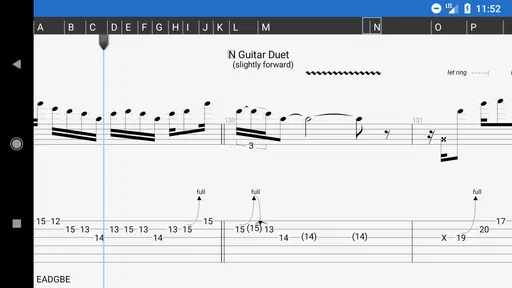
Now, let’s talk about the features that make Guitar Pro a standout in the app world. First up, the tablature editor. This is where the magic happens. Whether you’re a novice or a seasoned player, the editor is versatile enough to cater to your needs. You can write your own music scores or download tabs from the extensive library.
One of the coolest features is the ability to add multiple tracks. Whether you’re looking to layer guitars, drums, or even a little bit of bass, you’ve got it all at your fingertips. The app supports a variety of instruments, so you’re not just limited to guitar. This opens up endless possibilities for creating full band arrangements right from your phone.
Learning and Playing
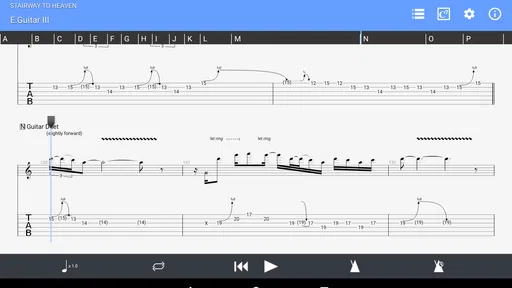
If you’re more into learning than composing, Guitar Pro has you covered. The app comes with playback features that allow you to listen to the tabs in real-time. This is super helpful for those tricky parts where you just can’t figure out the rhythm or timing. Plus, you can adjust the tempo, so if you need to slow things down to nail that solo, it’s just a tap away.
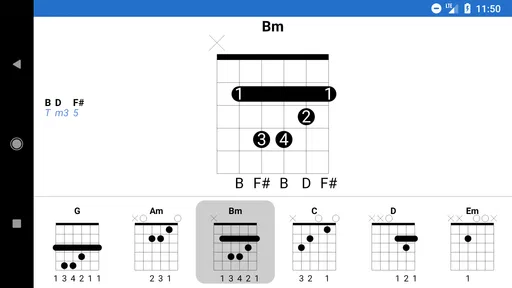
There’s also an integrated tuner and chord library, which are lifesavers when you’re on the go. No more fumbling with external devices or apps; it’s all in one place. The app also has a metronome to keep you in time, making it a fantastic practice tool.
Creating and Sharing
Once you’ve composed your masterpiece, sharing your work is a breeze. You can export your scores in a variety of formats, including PDF, MIDI, and MusicXML. This makes it easy to share with bandmates or upload to your favorite music platforms. The app’s compatibility with desktop versions of Guitar Pro is also a huge plus, as you can seamlessly transfer your work between devices.
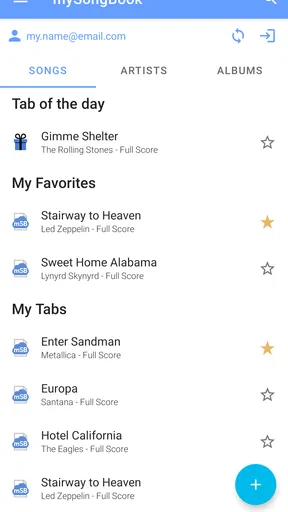
Another nifty feature is the ability to import files. If you’ve got a collection of tabs saved on your computer, you can easily bring them into the app and have your entire music library in one place. Talk about convenience!
Final Thoughts
So, is Guitar Pro worth your time and investment? Absolutely. Whether you’re a beginner looking to learn new songs or a composer aiming to create complex arrangements, this app offers something for everyone. Its user-friendly interface, combined with powerful features, makes it a top choice for musicians of all levels.
In conclusion, Guitar Pro is more than just a tab reader or a music notation app; it’s a complete music creation suite that fits in your pocket. If you’re serious about taking your guitar playing and music composition to the next level, this app is definitely worth checking out. So grab your guitar, download the app, and let your musical journey begin!
Verdict
Strengths of Guitar Pro
- User-friendly interface for easy navigation.
- Extensive library of tabs and scores.
- Advanced editing tools for customization.
- Supports multiple file formats.
- Realistic sound engine for playback.
Limitations of Guitar Pro
- Limited free features in the basic version.
- Requires subscription for full access.
- Occasional lag on older devices.
- No offline mode for tab library.
- Steep learning curve for beginners.
Similar Picks in This Category
View All
YouTube Music
Google LLC4.4

Samsung Music
Samsung Electronics Co., Ltd.3.8

Spotify: Music and Podcasts
Spotify AB4.3

JioSaavn - Music & Podcasts
Saavn Media Limited4.3

Lark Player:Music Player & MP3
Lark Player Studio - Music, MP3 & Video Player4.6

StarMaker: Sing Karaoke Songs
SKYWORK AI PTE. LTD.4.3
Frequently Asked Questions
What features does Guitar Pro offer for beginners?
Guitar Pro is designed to support both beginners and advanced musicians. For beginners, it offers a variety of learning tools such as chord diagrams, scale libraries, and a built-in tuner. The app also includes a wide range of tablatures and scores to practice with, helping newcomers get familiar with reading music and improving their skills.
Is Guitar Pro suitable for composing original music?
Yes, Guitar Pro is an excellent tool for composing original music. It provides a comprehensive suite of features including multi-track editing, customizable instrument tracks, and a variety of sound effects. Users can create complex compositions using different instruments, making it ideal for musicians looking to write and arrange their own pieces.
Can I import and export files in Guitar Pro?
Guitar Pro supports a range of file formats for both importing and exporting. Users can import MIDI, MusicXML, and other Guitar Pro file formats. Similarly, compositions can be exported in a variety of formats, including PDF and audio files, making it easy to share your work with others or use it across different platforms.
How user-friendly is the Guitar Pro interface?
The interface of Guitar Pro is designed to be intuitive and user-friendly. It features a clean layout with easy-to-navigate menus. Even users who are not tech-savvy will find it relatively straightforward to access the app's many features. The toolbars and settings are customizable, allowing users to tailor their workspace according to their preferences.
Does Guitar Pro require an internet connection to function?
Guitar Pro does not require a constant internet connection to function, which is beneficial for users who wish to practice or compose without relying on connectivity. However, an internet connection is necessary for downloading updates or additional content from the library, ensuring you have access to the latest features and resources.
